
Download Videoraptor – music video search, download music videos, YouTube music videos, AOL music videos, search engine for videos, music video downloader, video search tool, download videos from YouTube, download videos from AOL, music video collection, music video organizer
Overview
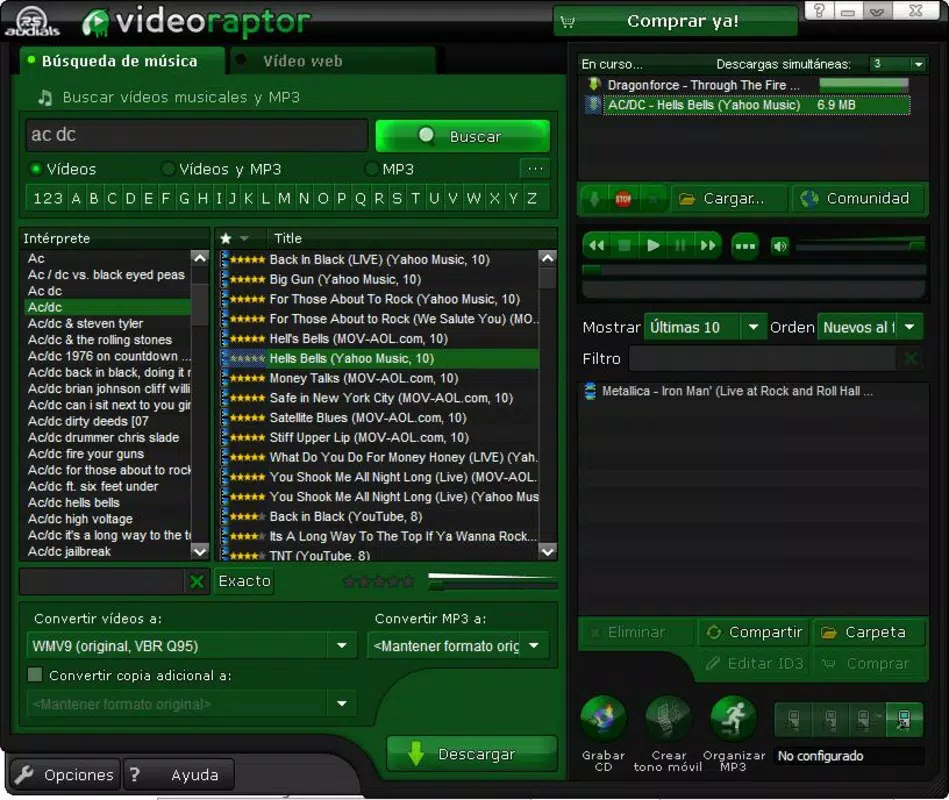
Videoraptor is a mobile application designed to simplify the process of locating and downloading music videos from major online platforms such as YouTube and AOL. The app functions as a specialized search engine tailored to video content, enabling users to quickly find specific music videos by entering a song title or artist name. This functionality addresses the common challenge of navigating multiple websites and fragmented search results when trying to access desired media. By consolidating search efforts across supported platforms, Videoraptor streamlines the discovery process and reduces time spent on manual browsing.
The target audience includes music enthusiasts, content curators, and individuals seeking to build or manage personal music video collections. Users who value convenience and efficiency in media access will find the app particularly useful. While the developer, Videoraptor Inc., is identified in the metadata, no additional background information is available regarding the company’s history or other products. The app was released on September 15, 2010, positioning it as one of the early mobile tools focused on video search and download functionality within the entertainment category.
Within the broader mobile app ecosystem, Videoraptor fills a niche for users who prioritize direct access to music videos without relying on third-party websites or complex workflows. Its integration of search, download, and media organization tools suggests a comprehensive approach to managing digital audiovisual content on mobile devices. Despite its age, the app remains relevant for users seeking a lightweight, dedicated tool for music video discovery and storage.
Key Features & Functionality
- Robust Search Engine: Videoraptor enables users to search for music videos across multiple platforms including YouTube and AOL. By entering a song or artist name, the app retrieves relevant results from these sources, reducing the need to visit individual websites.
- Organized Results: Search results can be sorted based on user preferences such as video quality or file size. This allows users to choose between high-resolution downloads and smaller files optimized for storage or transfer.
- Media Management Tools: The app includes utilities such as video and audio compressors, an MP3 organizer, and a CD burner. These tools support users in managing and preparing media files for local storage or physical distribution.
- Ringtone Creation Assistant: Users can extract audio segments from music videos to create custom ringtones. This feature enhances personalization of mobile devices and allows users to use favorite tracks as alert sounds.
- Mobile Device Synchronization: Videoraptor supports syncing downloaded content with connected mobile devices, ensuring media is accessible across platforms and improving portability.
For example, a user looking for a rare music video from the early 2000s can search for the artist and song, filter results by quality, and download the video directly. After downloading, they can compress the file for easier storage, extract a portion for a ringtone, and sync it to their phone—all within a single interface. This workflow demonstrates how the app integrates multiple functions into a cohesive user experience.
Interface, UX & Performance
The user interface of Videoraptor appears to prioritize functionality over visual flair, focusing on accessibility and ease of navigation. The layout is structured around core actions: search input, result display, and file management options. Navigation is likely linear, guiding users from search to download to organization, with minimal distractions. This design supports users who value speed and efficiency, particularly those managing large media libraries.
Although the developer did not list formal performance metrics, the app’s file size of 2.3 MB suggests a lightweight footprint, which may contribute to smooth operation on older or lower-end Android devices. Responsiveness is expected to be consistent given the app’s minimalistic design and limited scope. Stability is likely maintained through focused functionality, avoiding the complexity that can lead to crashes in feature-heavy apps.
Users should expect straightforward interactions with minimal learning curve. The absence of advanced customization options implies a standardized experience across devices. However, the developer did not provide additional technical details regarding supported screen sizes, hardware acceleration, or background processing. Compatibility with modern Android versions remains uncertain, though the app’s long-standing presence may indicate continued basic functionality on updated systems.
Platform Compatibility & Technical Requirements
Videoraptor is available exclusively on the Android platform. The current software version is 1.0, with a file size of 2.3 MB. The app was released on September 15, 2010, making it one of the earlier mobile applications in the entertainment category focused on video search and download.
The developer did not specify minimum OS requirements, nor did they list compatibility with specific Android versions. As such, users should verify whether the app runs on their device, particularly if using a modern Android system. The small file size suggests it may function on older devices with limited storage and processing power. However, without official compatibility information, users are advised to test the app on their specific device before installation.
Pros and Cons
Pros
- Lightweight design with minimal storage footprint (2.3 MB)
- Direct access to music videos from YouTube and AOL
- Ability to organize results by quality or file size
- Integrated tools for media compression, organization, and CD burning
- Supports ringtone creation from video content
- Enables synchronization with mobile devices
Cons
- App version is outdated (1.0), released in 2010
- Developer did not disclose OS compatibility requirements
- Platform availability limited to Android only
- No information on current support or updates
- May not function reliably on modern Android systems
- Security and privacy policies were not provided
FAQ
Is Videoraptor safe to download and use?
The app is available for free and does not require root access. However, since the developer did not publish a privacy policy or security details, users should exercise caution when installing apps from older sources.
Can I use Videoraptor on iOS devices?
Currently, the app is only available for Android. There is no official iOS version or indication of future support.
Does Videoraptor require internet access?
Yes, an active internet connection is required for searching, retrieving results, and downloading music videos from online platforms.
Are there any updates for Videoraptor?
The app’s latest version is 1.0, released in 2010. No updates have been reported, and the developer has not announced any future releases.
Can I download videos from platforms other than YouTube and AOL?
The app is designed to search and download from YouTube and AOL. No other platforms are listed in the provided information.
Final Thoughts
Videoraptor stands as a pioneering tool in the mobile entertainment space, offering a focused solution for music video discovery and management. While its age and lack of updates raise concerns about compatibility and security, the app remains a viable option for users seeking a simple, no-frills way to search and download music videos from YouTube and AOL. Its bundled tools for compression, organization, and ringtone creation add practical value beyond basic downloading.
Those who value a lightweight, single-purpose app for managing music video content—especially on older Android devices—may find significant utility in Videoraptor. For modern users, the app may serve as a nostalgic or experimental tool, though caution is advised due to its outdated status.
Download Videoraptor now


